RecurDyn is a multibody dynamics program for studying the motion of mechanical systems.
This introduction follows the workflow from building a model to running a simulation and reading its results, using material from my 2025 SSHS Lab training lecture.
Multibody Dynamics
Multibody dynamics describes how connected bodies move under applied forces and constraints. A joint controls relative motion between bodies; forces and torques determine their dynamic response.
A degree of freedom is an independent coordinate needed to describe a system’s configuration. A free rigid body in three-dimensional space has six: three translations and three rotations. Connections restrict those freedoms. The modeling task is to retain the motions the mechanism needs while representing the connections that guide or prevent other motion.
Body and Marker
A Body is a unit of the mechanical model, with its own mass, inertia, position and orientation. Its Geometry describes its shape. Several geometric shapes can belong to one body and move together. Creating or importing a shape is therefore only part of building a dynamic model.
A Marker is a local coordinate frame attached to a body. It defines a position and orientation for a joint, load or measurement. The global frame describes the overall model; local frames describe locations and directions relative to individual bodies. A marker’s orientation matters when specifying a joint axis or interpreting a force component.
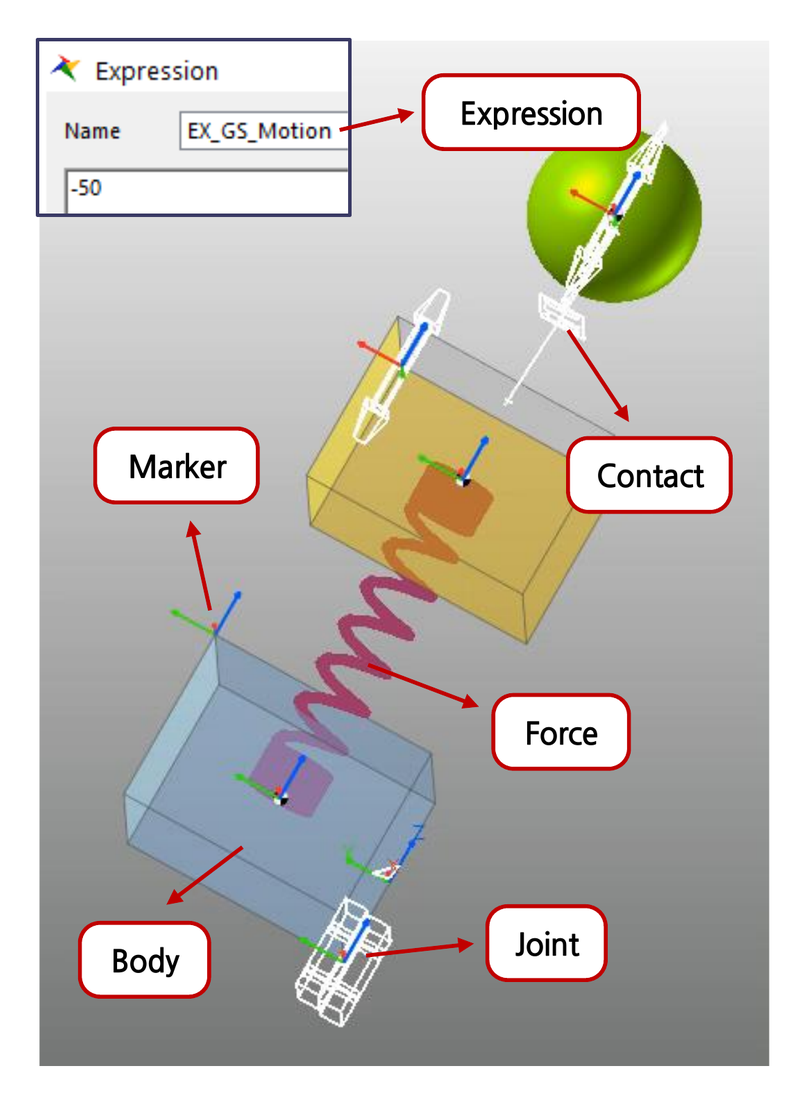
Joint
A Joint constrains relative motion through markers on two bodies. The Base Marker provides the reference, and the Action Marker belongs to the other connected body. These names describe their roles in the connection; the Base Body can also move.
Three common joints cover many basic mechanisms:
- A Fixed Joint prevents relative translation and rotation.
- A Revolute Joint permits rotation about one axis.
- A Translational Joint permits sliding along one axis while maintaining relative orientation.
For revolute and translational joints, the permitted axis is defined by the joint markers. Aligning that local axis with the intended hinge or guide direction is as important as selecting the joint type.
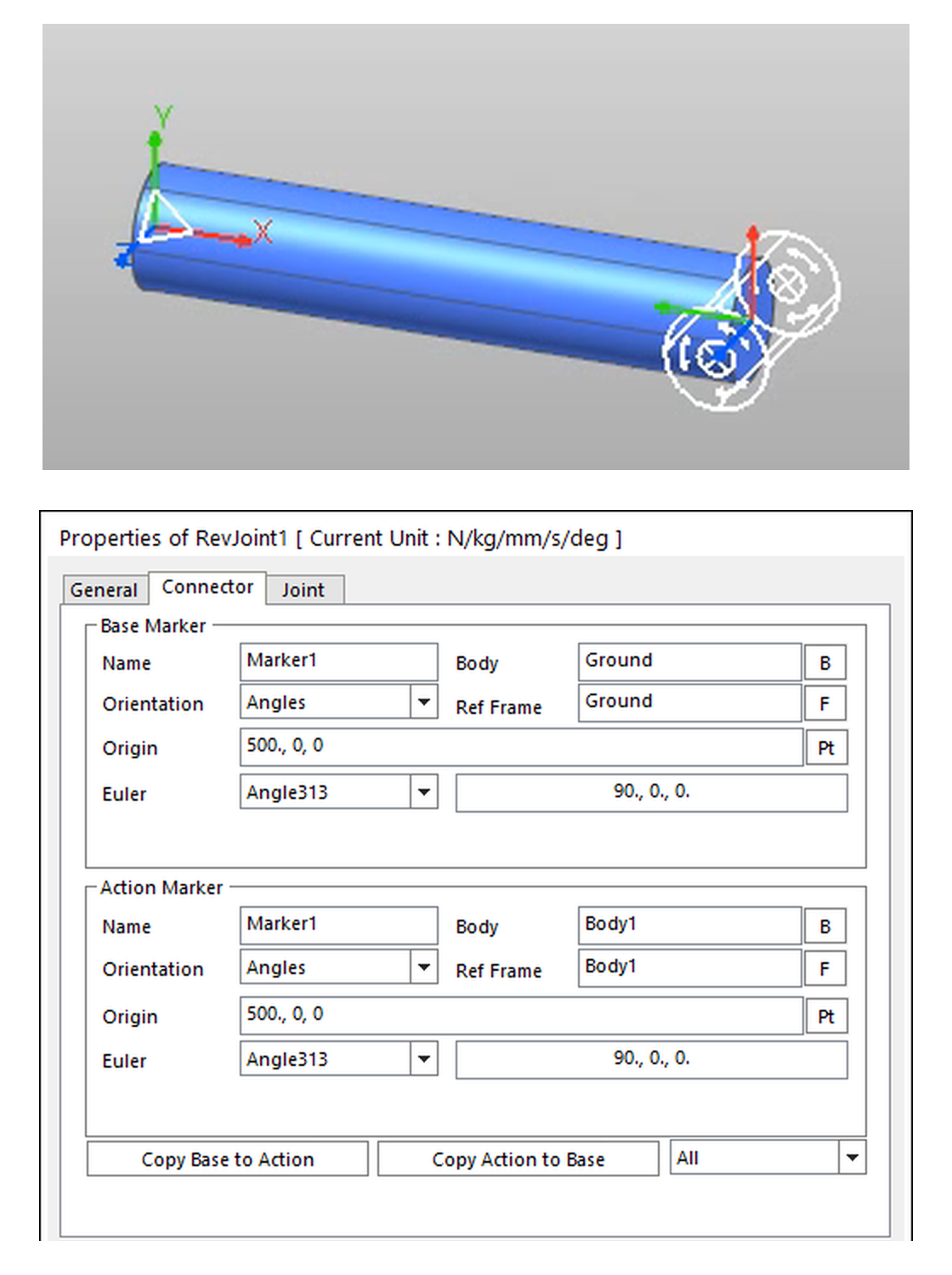
The Connector properties identify the two markers and their positions and orientations. Check these fields when a connection behaves unexpectedly. Two markers can occupy the intended location while having different orientations.
Revolute and translational joints can also carry prescribed Motion. Standard Motion accepts a displacement, velocity or acceleration expression. Choose the input type to match the quantity being supplied: an expression intended as displacement has a different meaning in a velocity field. The solver calculates the loads required to enforce prescribed motion.
Inspect relative motion and joint reaction loads after a run. A revolute connection should keep the origins of its two markers coincident while allowing rotation about the joint axis; a translational connection should retain relative orientation. Reaction loads show the forces or torques needed to enforce these constraints.
An OnOff Joint selectively constrains the six relative degrees of freedom. With Include On Condition enabled, a nonzero expression value activates the selected constraints. The modeling exercise uses this feature to hold a launch plate and then release it.
Force
A Force entity applies a load or torque. An axial force acts along the line between two points, while a rotational axial force acts about a defined axis. Check the Base and Action markers, the positive direction and the expression defining the load.
A spring-damper provides a useful example of a load that depends on the current motion. For a simple linear axial spring-damper with zero preload, take the positive direction on the Action Body from the Base point toward the Action point:
Here, is the current distance between the points, is the free length, and is the rate at which that distance changes. The coefficients and are stiffness and damping. The minus signs mean that the force opposes extension and the rate of extension; the other body receives the opposite force. With lengths in millimetres and time in seconds, has units of N/mm and has units of N·s/mm.
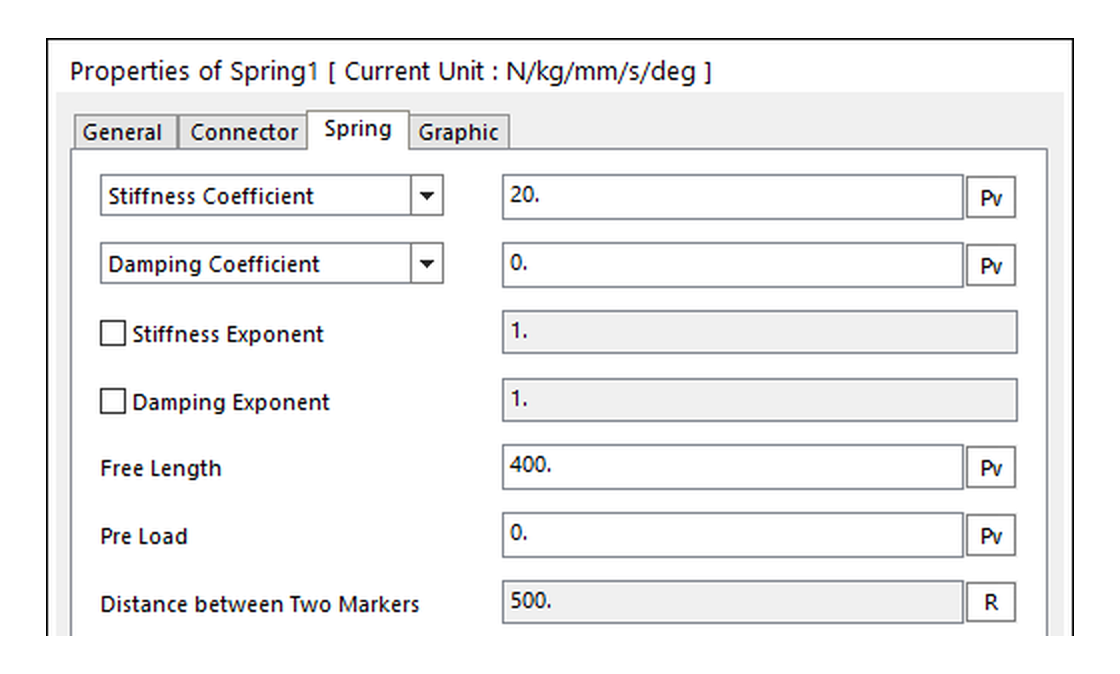
The Spring properties separate Stiffness, Damping, Free Length and Pre Load. The displayed example uses stiffness 20 N/mm, free length 400.00 mm and a marker distance of 500.00 mm. It is already extended by 100.00 mm. Free length is the unloaded reference length; it need not equal the initial marker distance.
Compare the spring-force history with its deformation relative to the free length. For the linear spring with zero preload and damping, the force should vanish at the free length. The later modeling exercise is a separate setup, also using a free length of 400.00 mm.
RecurDyn also provides nonlinear exponents and spline-based definitions. A spline describes a relationship through supplied data, such as force versus deformation.
A Rotational Spring applies the same idea to relative angle and angular velocity, producing a torque about its axis. Its reference is a free angle rather than a free length. Spring graphic settings, such as coil diameter and number of coils, control the displayed shape; the force properties define the mechanical response.
Contact
A Contact interaction transfers loads between selected surfaces. Unlike a permanent joint connection, contact depends on the bodies’ current positions. In the exercise, it lets the launch plate push the moving body and lets that body transfer a load to the receiving mechanism.
The lecture uses Geo Surface Contact, which represents selected surfaces with patches divided into facets. Contact detection uses this surface representation. Check the selected faces and their normal directions so the intended sides can interact.
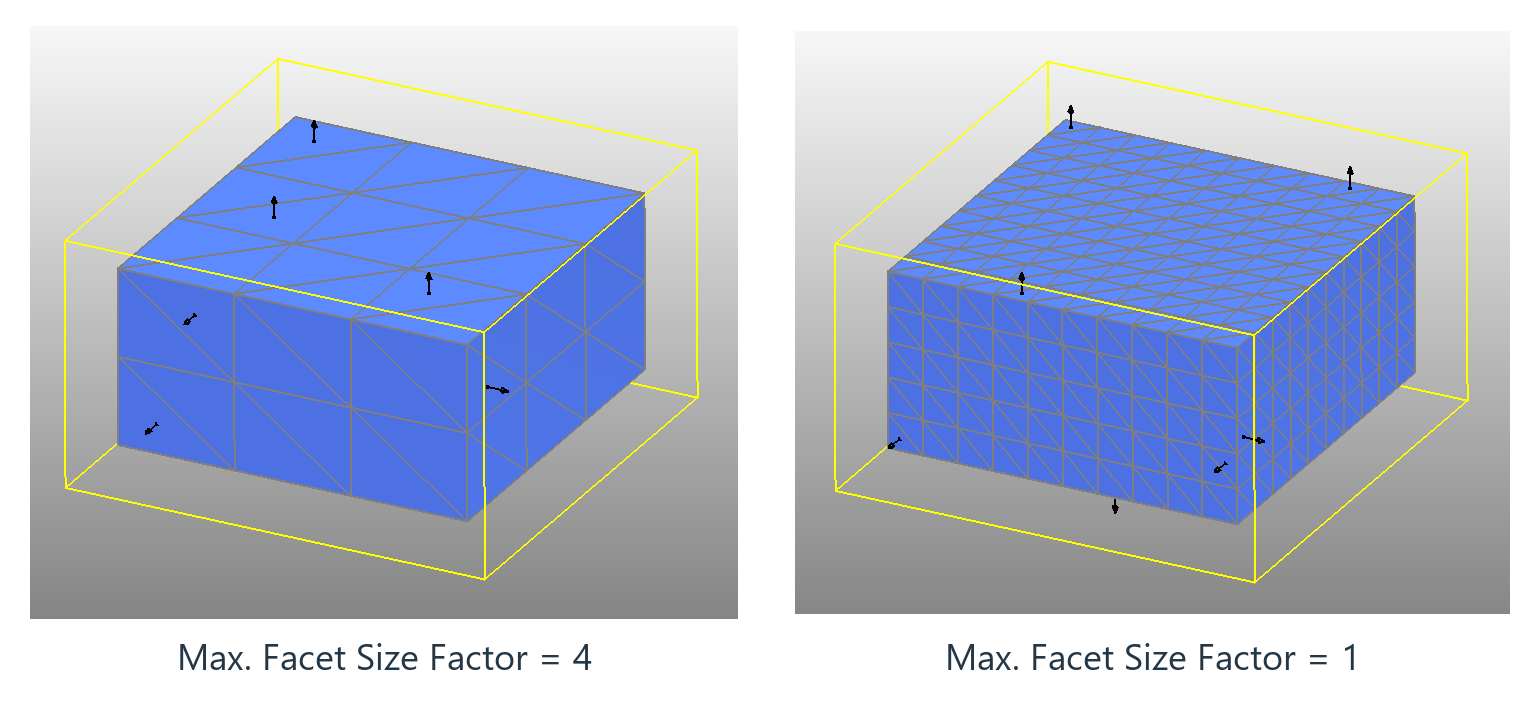
The figure shows Max. Facet Size Factor values of 4 and 1 on the same box geometry. The smaller factor limits facet size more tightly, producing a finer surface representation. Select the resolution around the contact region and the features that determine where surfaces meet.
The contact model uses a penalty method: numerical penetration between surfaces generates a resisting force. A simple expression for the elastic contribution is
Here, is penetration, is the contact stiffness coefficient and is the stiffness exponent. If force is in newtons and penetration in millimetres, has units of N/mm. This equation describes the elastic contribution only. Damping changes the normal force during approach and rebound, while friction acts tangentially to the contact surfaces.
Several Geo Contact settings have distinct roles:
- Stiffness and damping govern the force response to penetration and relative motion.
- Friction coefficients describe resistance to relative tangential motion.
- Maximum Penetration is a cutoff: if penetration at a contact point exceeds it, the force at that point is ignored. It does not enforce an upper bound on physical penetration.
- Maximum Step Size Factor reduces the solver’s maximum time step for contact.
Choose these settings together with the geometry and motion being modeled. To examine time-step sensitivity, reduce the maximum time step while keeping the geometry, force parameters and output sampling unchanged. Compare contact-force peaks, maximum penetration and impact timing between runs. Changes in these quantities show how strongly the result depends on time resolution.
In the lecture exercise, both contact groups use Maximum Penetration = 10.00 mm and Maximum Step Size Factor = 4. These are inputs for this practice model.
Expression
An Expression defines a mathematical relationship used by another entity. It can prescribe joint motion, supply a force, measure a distance or control whether a constraint is active. Its receiving field determines the required quantity and units.
For a gradual change between two values, STEP(x, x0, h0, x1, h1) interpolates from to as moves from to . It uses a cubic transition. In the exercise, the displacement motion of the launcher assembly is
STEP(time, 0, 0, 4, 800)This moves the prescribed displacement from zero to 800.00 mm over four seconds, then holds the final value. The transition is smooth; it does not describe constant-velocity travel.
An IF expression selects a value according to a condition. Its form is IF(f1: f2, f3, f4): the second, third and fourth arguments supply the negative, near-zero and positive branches. The solver’s IF Tolerance defines the near-zero interval.
The launch plate uses
IF(time - 4.5: 1, 0, 0)Before the release condition is reached, the expression returns 1 and the selected OnOff constraints hold the plate. It changes to 0 as the condition enters the near-zero interval around 4.5 seconds, releasing those constraints.
Expressions can also refer to model entities. DM returns the distance between two marker origins:
DM(Body1.CM, Body2.CM)The same expression can be written as
DM(1, 2)when the Argument List assigns 1 to Body1.CM and 2 to Body2.CM. Those numbers identify arguments in that expression.
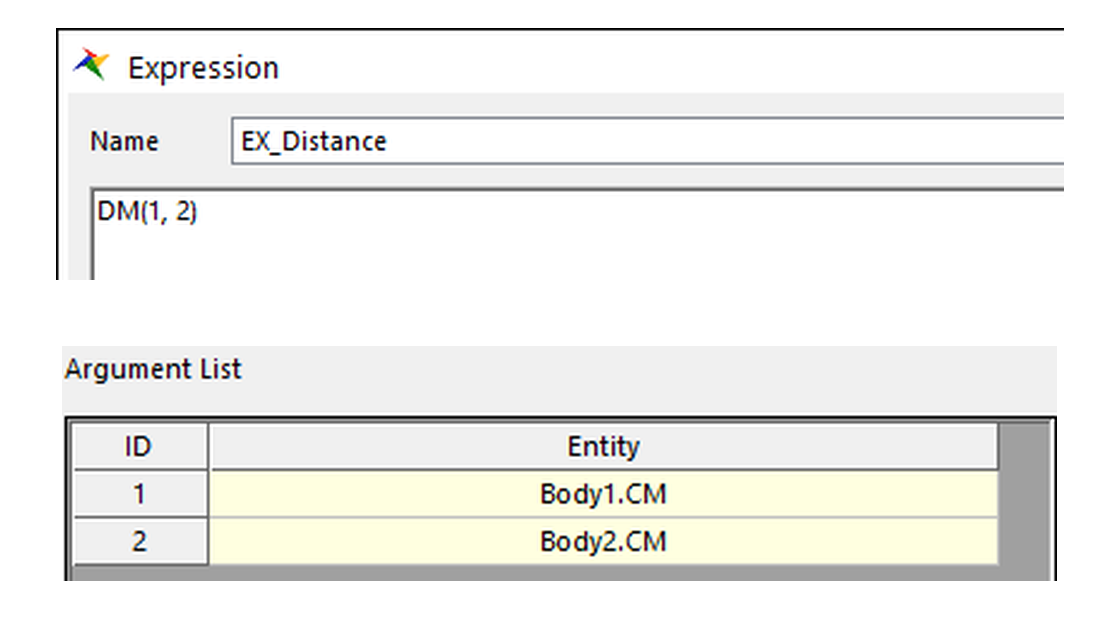
Use the Expression Helper to check a function’s arguments and return value. Confirm that the expression measures or supplies the intended quantity before assigning it to a motion or force.
Model Parameters
A Parametric Value (PV) stores a reusable value, such as a link length. Even when defined by an expression, a PV takes that expression’s initial value and remains constant during the simulation. Use a motion or force expression when the quantity must vary during the run.
A Parametric Point (PP) stores a reusable position. Its coordinates can depend on PVs or be defined relative to a marker. Defining related locations through the same parameters makes it easier to change dimensions while preserving the relationships between parts.
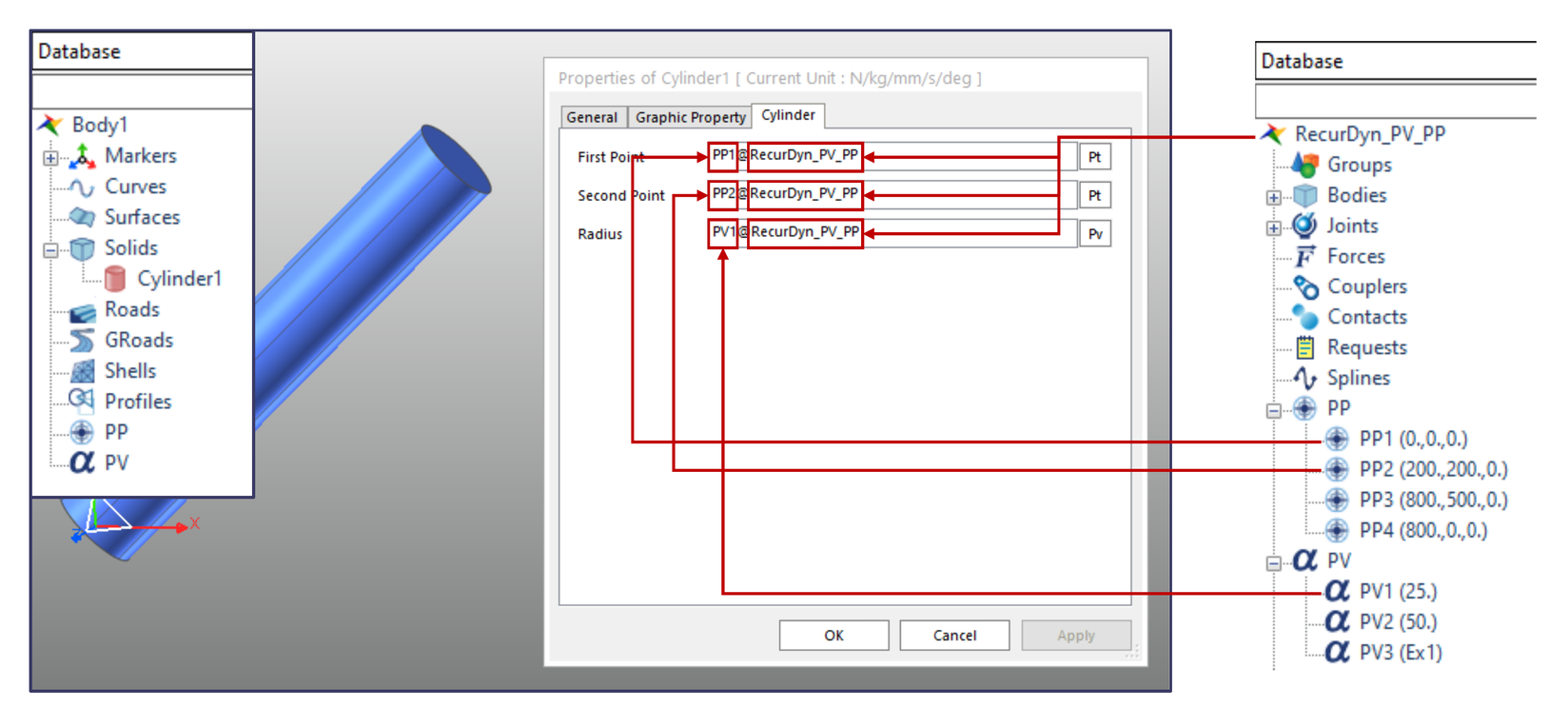
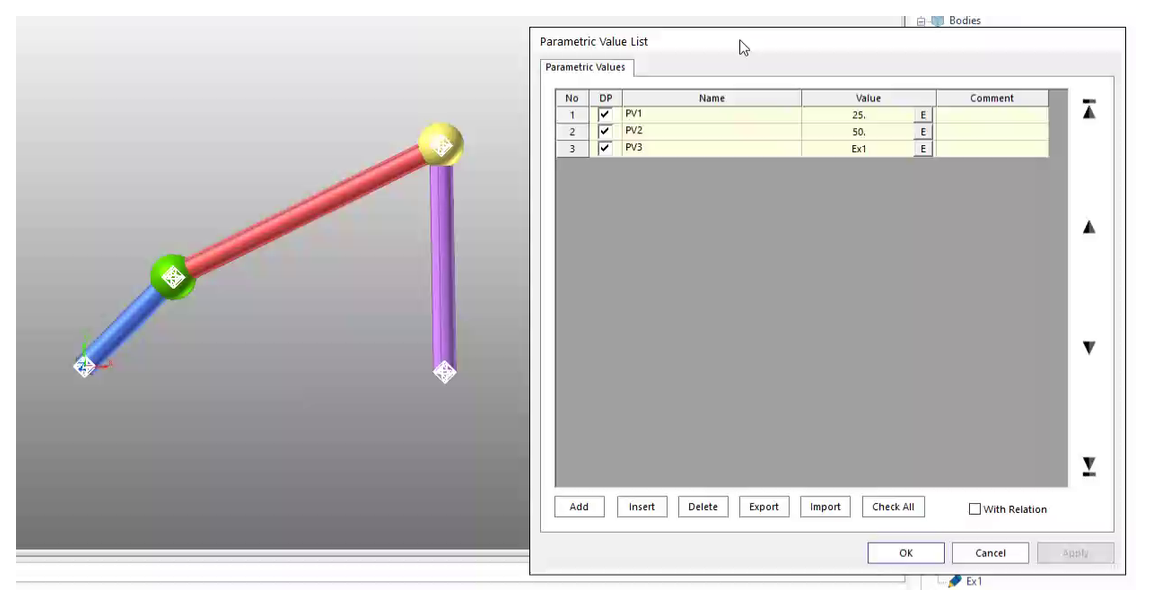
A Subsystem groups related bodies, joints, forces and parameters into a component with its own database. It helps organize a larger model and reuse connected groups of entities.
Simulation Settings
Choose the analysis according to the question. A dynamic analysis computes motion over time, while a static analysis finds an equilibrium configuration. The Pre analysis reports the model’s degrees of freedom and helps check its constraints.
Before running, check mass properties, gravity and initial conditions. For a dynamic analysis, set the simulated duration and the output to save. Animation frames describe successive configurations; plot output stores histories of selected quantities.
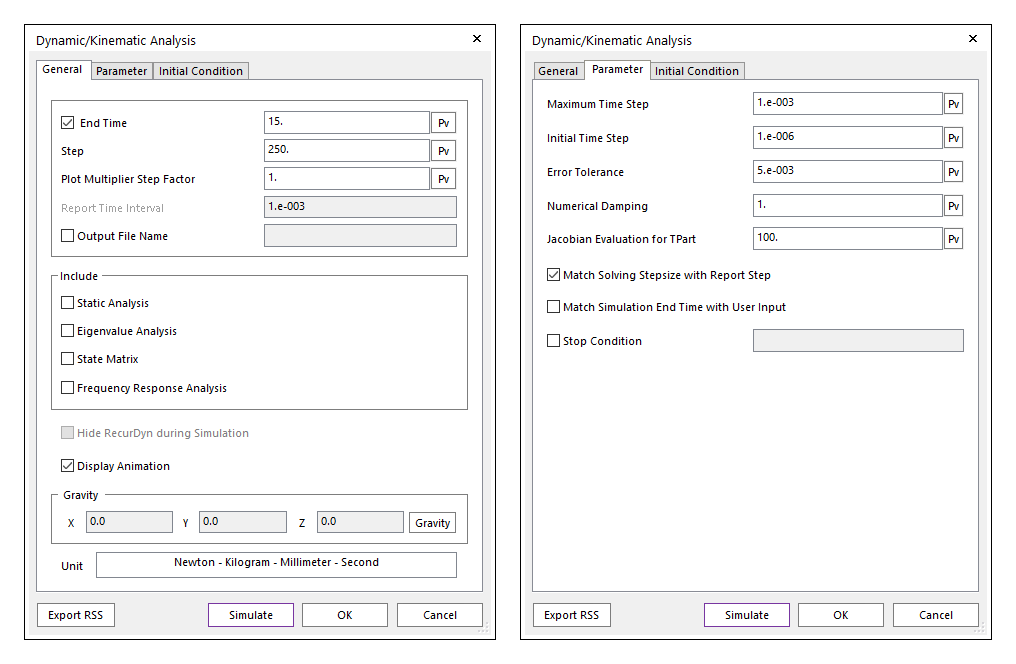
The solver’s time steps are a separate setting. Maximum Time Step limits the interval used to advance the solution. Increasing the number of saved frames alone does not resolve a brief contact event. Select the time-step settings around the motion and loads of interest, then examine whether rapid changes are represented adequately.
Simulation Results
Use the animation to inspect the sequence of motion, joint behavior and contact. Marker traces follow selected points, and force vectors show where loads act. Plots provide the corresponding quantities over simulated time.
The exercise results include the translational spring force in newtons, the moving body’s Y-velocity in millimetres per second, and the rotational spring torque in newton-millimetres.
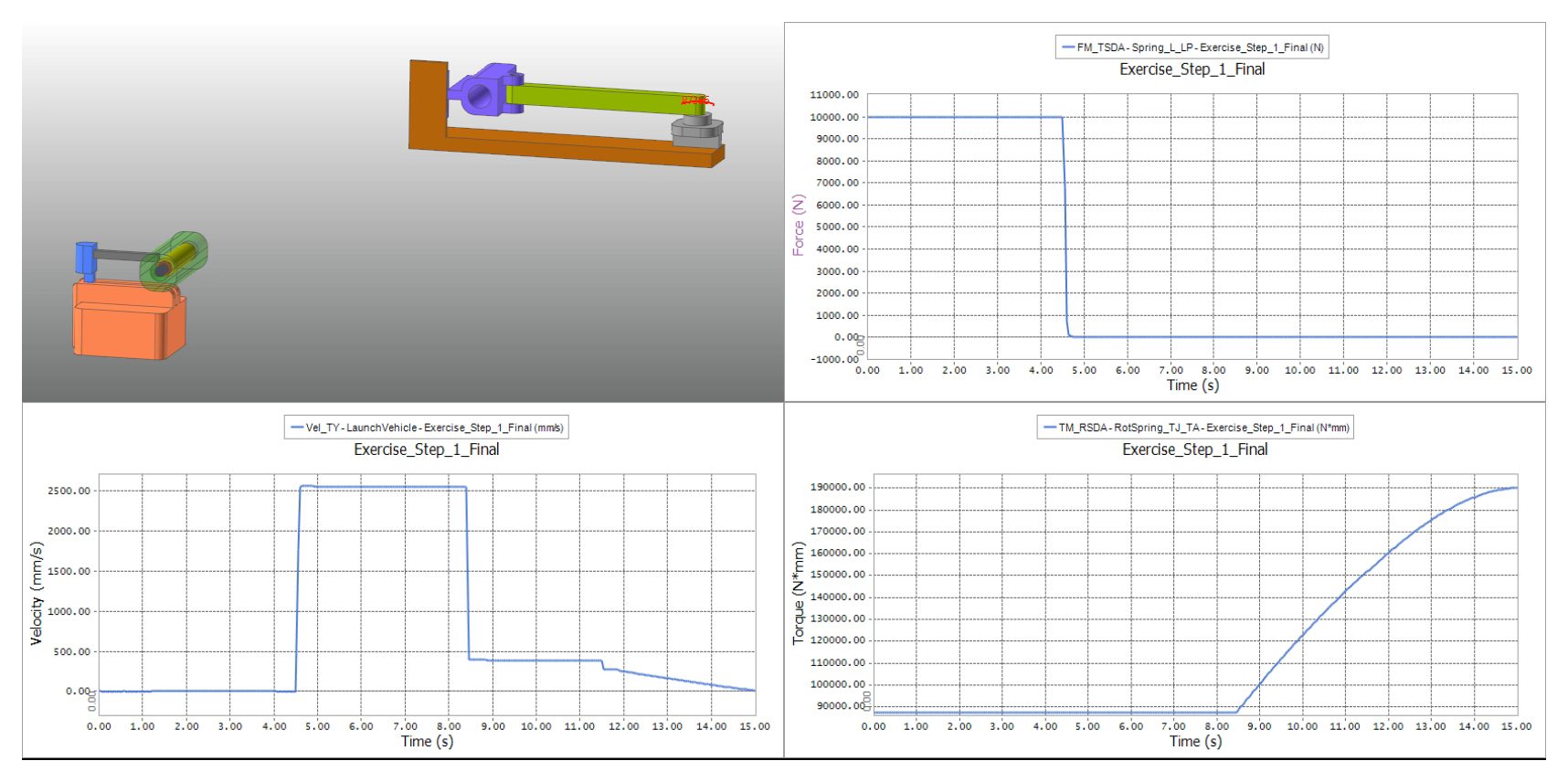
For each curve, identify the measured body or connector, the component and its units. For directional quantities, also check the reference frame. Relating changes in the curves to events in the animation helps connect the model’s settings to its response.
Modeling Exercise
The practice model combines a launcher and a receiving linkage. Fixed joints connect parts that move together; translational and revolute joints guide the remaining motion. Two spring elements provide forces and torques, contact pairs transfer loads, and expressions control the sequence.
First, the launcher assembly translates through 800.00 mm over four seconds using the STEP displacement expression. An OnOff joint holds the launch plate relative to the launcher during this movement.
At the specified 4.5-second release, the OnOff condition removes the plate’s constraints. The translational spring drives the plate, which pushes the moving body through contact. That body travels toward the receiving assembly, where further contact transfers its load to the linkage and rotational spring.
The model runs for 15 seconds with gravity set to zero. Watching the sequence alongside the force and velocity histories shows how joints, springs, contact and expressions work together.
Lecture Material
The lecture material includes the modeling steps, entity settings and additional examples.
For further detail, the lecture also references FunctionBay’s Expression Handbook and RecurDyn contact tutorial.