Part 2 · Dynamics problems and workflow verification
Familiar dynamics problems provide a clear way to examine an AI-assisted simulation workflow. Their bodies, constraints and expected outputs are easy to identify, so the path from a request to an assembled model, a solver run and a result plot can be inspected step by step.
RecurDyn ProcessNet Toolkit gives a large language model (LLM) documented capabilities and API evidence for preparing simulation scripts. These examples examine how a surrounding workflow carries that work through model construction, RecurDyn analysis and result inspection.
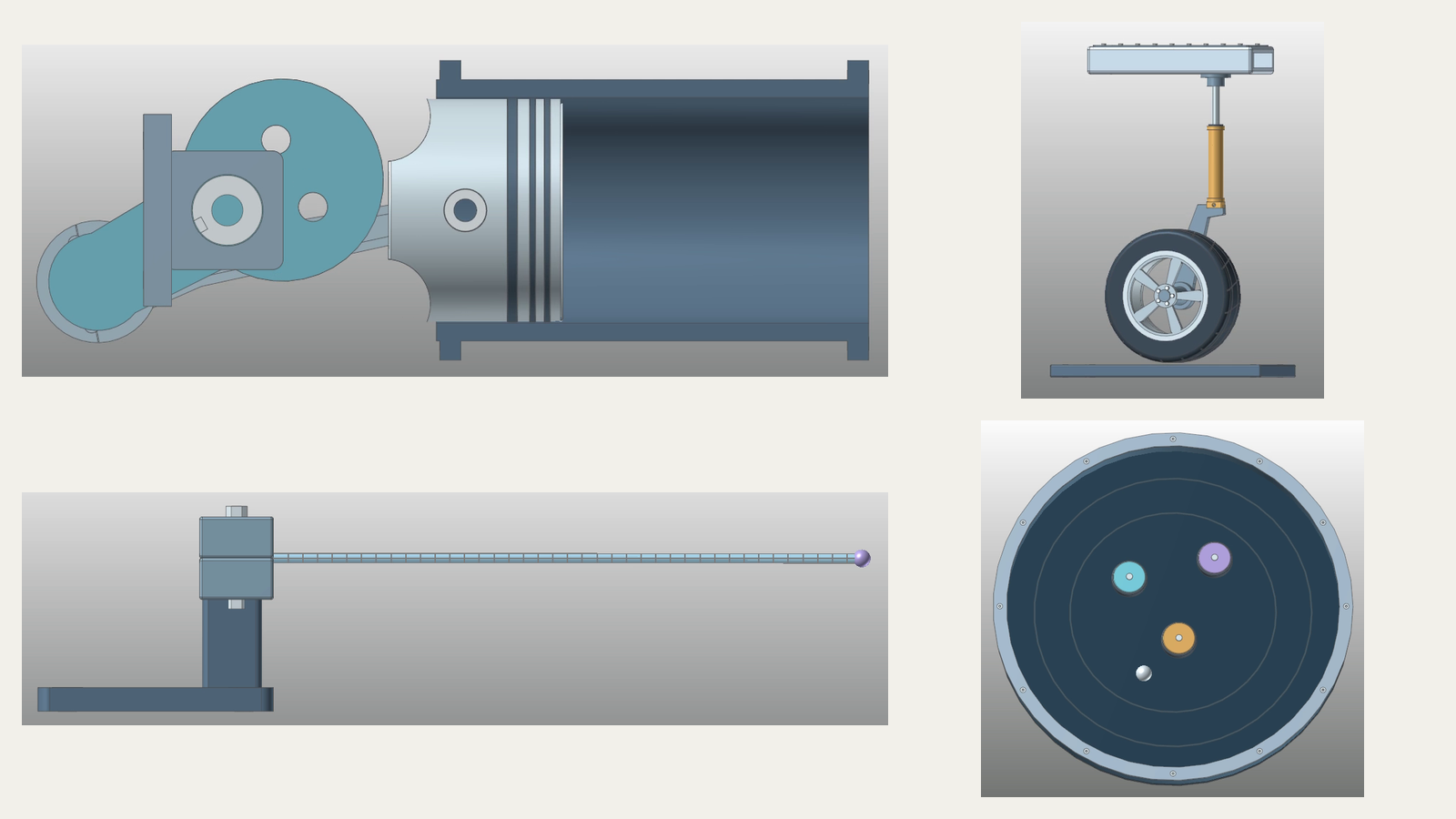
Using Familiar Problems to Examine the Workflow
Textbook dynamics starts with a physical question and an idealized model. Turning that model into a simulation adds another chain of work: create the bodies, define their connections and loads, configure the analysis, run it and extract the quantity of interest.
That chain is the focus of these examples. The piston problem has a specific textbook source; the suspension and beam cases use familiar teaching models. A mini-pinball example extends the scope to contact and stored motion. Together, they exercise different parts of the developed workflow without requiring a large research model to explain each step.
| Example | Engineering question | Workflow task |
|---|---|---|
| Piston and connecting rod | What force acts at a mechanism joint? | Assemble the mechanism, inspect it, solve and extract a joint-force history. |
| Quarter-car suspension | How does the response change with damping? | Build a guided mass–spring–damper model and compare acceleration histories. |
| Flexible beam | How does an attached tip mass affect the response? | Prepare a flexible model, apply an excitation and compare displacement histories. |
| Mini pinball | How can computed contact motion be inspected? | Build and inspect the contact model, then plot and replay stored motion. |
The verification question is whether the workflow carries the requested modeling and analysis operations through to inspectable outputs. The first three cases also compare simulation results with a numerical or analytical reference for the stated model. The contact example focuses on inspecting stored computed motion. These checks establish the demonstrated scope; physical validation would require experimental evidence.
Piston and Connecting Rod: From Geometry to Joint Force
The first case is based on the piston-and-connecting-rod problem in Meriam and Kraige’s Dynamics, 7th edition, Problem 6.105, using FunctionBay e-learning material.
A mechanism’s geometry identifies its parts, but a dynamics model also needs their mechanical relationships. During model preparation, the ground, crank, connecting rod and piston are assembled, masses are assigned, and joints and a translational guide define the permitted motion. The prepared model is inspected before the analysis.
After the solve, the script extracts the force history at pin A. The mechanism’s motion helps inspect its kinematics; the force plot answers the load question at the selected connection.
The RecurDyn pin-force curve is compared with a Newton–Euler reference. At a crank angle of 90°, both values round to 1,521.55 N for this modeled case. That agreement at the displayed precision gives the output review a concrete reference point.
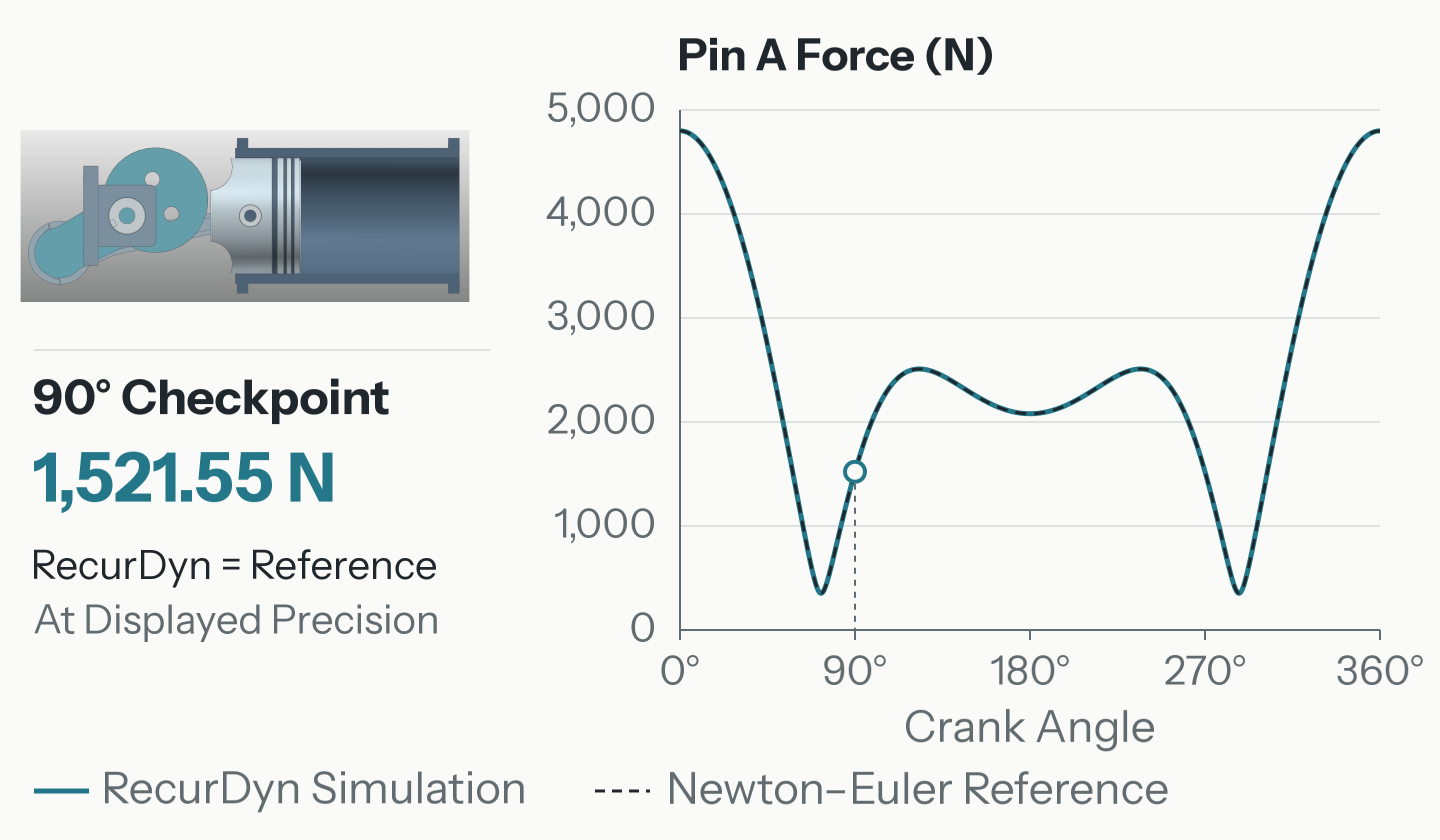
This case checks whether the assistant returns the force at the intended joint after building and analyzing the requested mechanism.
Quarter-Car Suspension: Carrying a Parameter Change Through the Analysis
A quarter-car model represents the vertical response of a vehicle body and wheel assembly using two masses with suspension and tire elements. A road input excites the system, making it a familiar setting for examining damping and vibration.
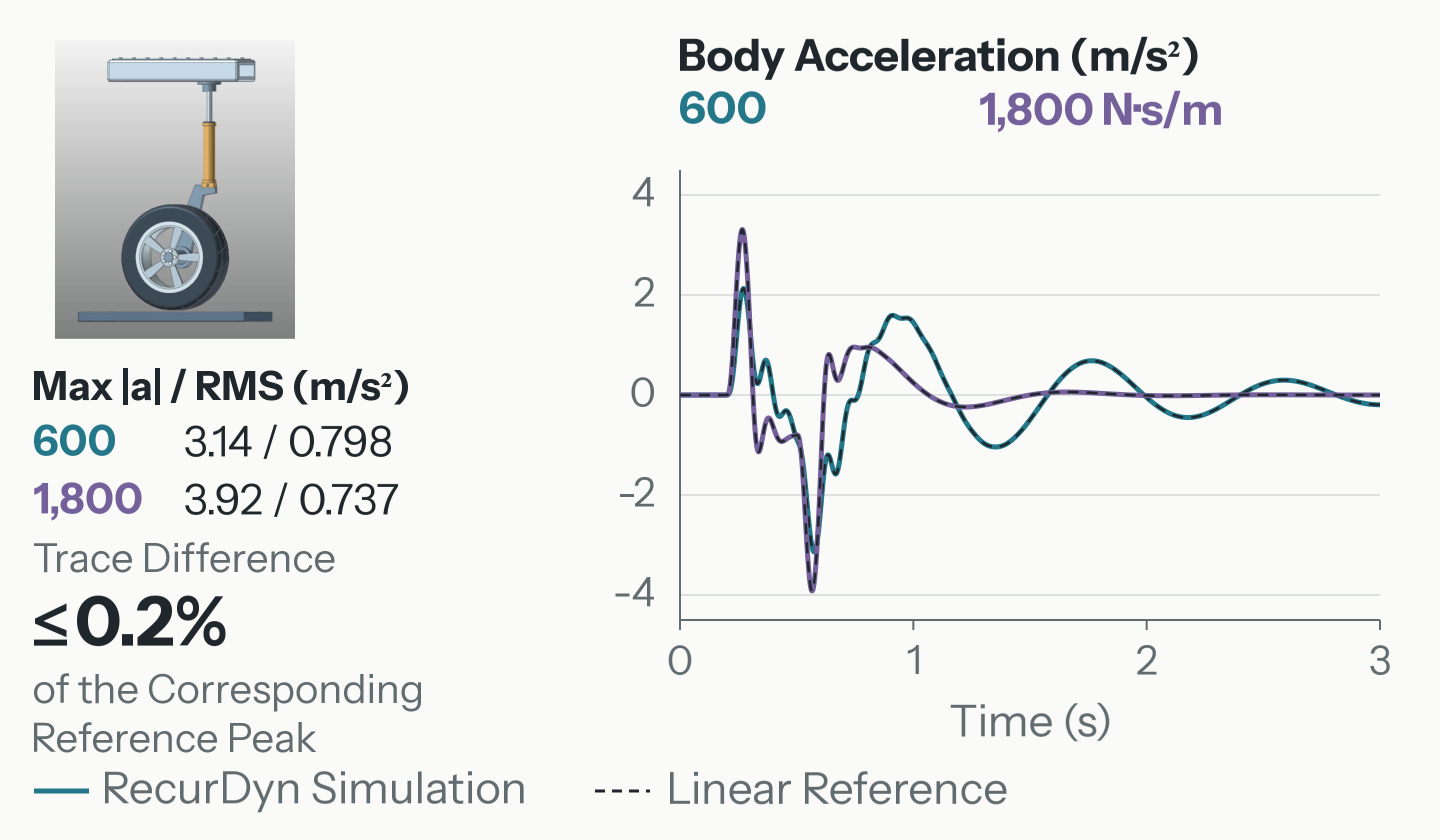
The preprocessing script prepares the body- and wheel-equivalent masses, vertical guides, suspension and tire elements, and a road-bump input. It then carries a change in suspension damping through the analysis and compares the body-acceleration histories. The analyses use damping values of 600 and 1,800 N·s/m, where N·s/m is the unit of a viscous damping coefficient.
The comparison associates each response with its damping setting. Its engineering interpretation depends on the chosen input, model assumptions and response measure; these two cases do not identify a universally better setting.
For the displayed 0–3 s comparisons, the RecurDyn body-acceleration histories are compared with a linear two-degree-of-freedom reference. For both conditions, the trace difference is within 0.2% of the corresponding reference peak acceleration magnitude. This is a peak-normalized trace comparison, rather than a percentage error at every instant.
The summary pairs the peak acceleration magnitude with RMS (root mean square), which measures response magnitude across the 0–3 s window.
Flexible Beam: Comparing Transient Responses
The third case introduces deformation. A flexible beam is clamped at one end, carries an attached tip mass and receives a brief excitation at the tip. The output of interest is the tip-displacement history, which records how the beam moves after the excitation.
The workflow prepares the flexible model, its clamp and tip attachment, applies the excitation and runs the analysis. Two tip masses, 5 g and 15 g, provide a controlled change to compare. The resulting displacement traces show how the computed transient response differs between those cases.
Zero crossings of the simulated 0–0.5 s tip responses give 32.24 Hz for a 5 g tip mass and 21.22 Hz for 15 g, alongside Euler–Bernoulli reference values of 32.25 and 21.22 Hz. These frequencies are inferred from the transient motion, rather than obtained from a separate modal or eigenvalue analysis.
The displacement plot shows the first 100 ms. Node shapes are sampled at 60 ms with Z displacement magnified 100×.
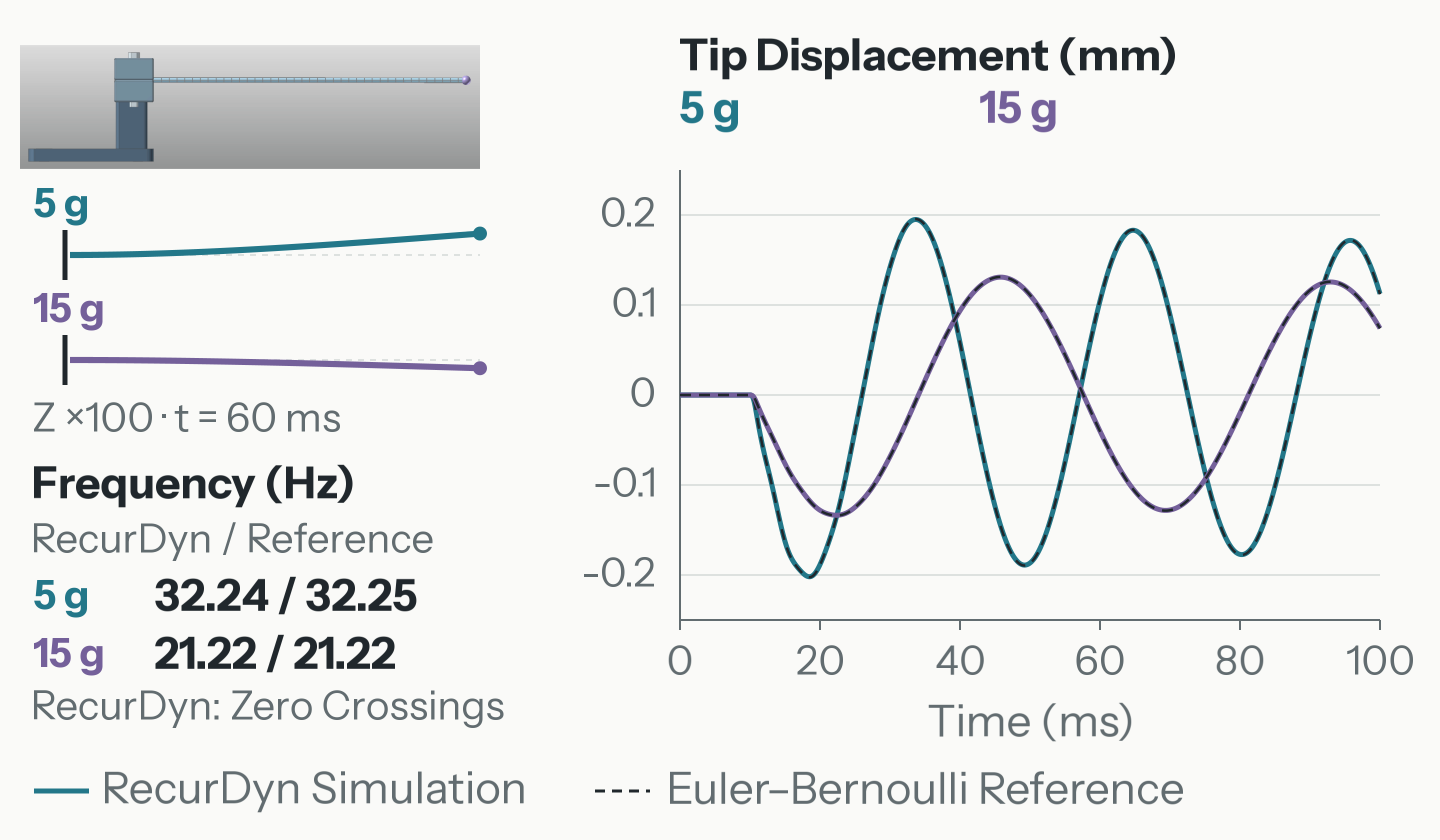
This case extends the workflow to a flexible system, with tip mass as the changed parameter and transient displacement as the compared output.
Mini Pinball: Inspecting Computed Contact Motion
The final case uses a board, ball and bumpers to introduce contact. Contact adds interactions that depend on the evolving motion, making both model inspection and result playback useful parts of the review.
The preprocessing script builds the model and defines its constraints and contacts. Model inspection precedes a short 0–0.3 s solver run. Postprocessing then uses a separate stored 0–6 s computed-motion result to plot the ball’s position and replay its trajectory. The stored interval is not the output of the short run.
The stored 0–6 s result is reviewed through its position history, trajectory and contact-event timeline. The timeline locates interactions in time; playback relates the computed motion to the board and bumpers.
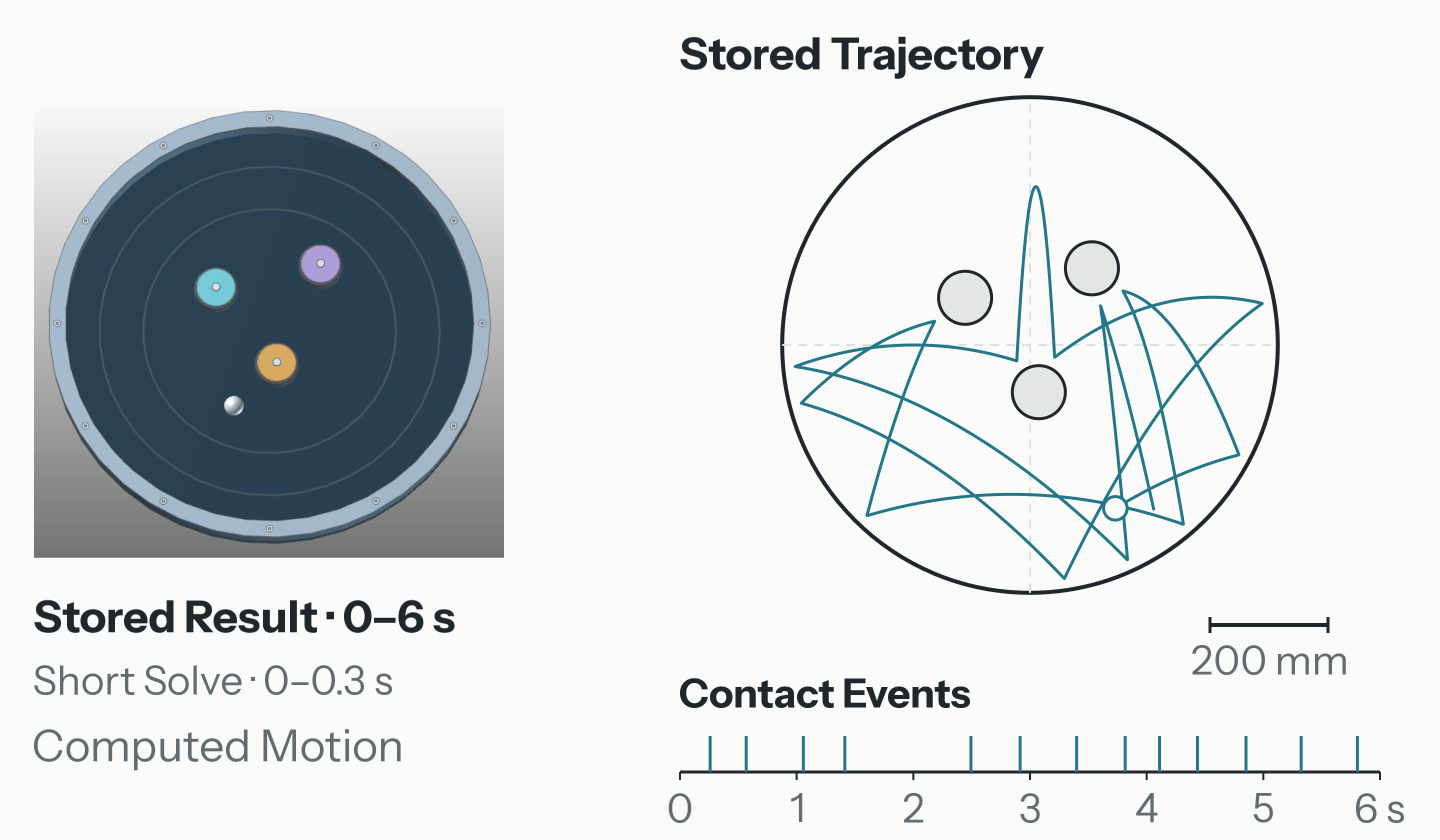
This demonstrates inspection of computed motion; it does not establish convergence or physical validation of the contact model.
What the Four Cases Show Together
The examples progress from rigid-body mechanism construction to parameter comparison, flexible response and contact-motion inspection. Each makes a different part of the workflow observable while preserving a common sequence: define the task, prepare the model, inspect the work, run an analysis or retrieve a stored result, then examine the output.
The Toolkit supports the LLM in selecting documented operations and writing the Python ProcessNet scripts that express this work. Execution, result inspection and engineering judgment complete the surrounding workflow.
The same approach offers potential value in preparing repeatable studies, comparing model variants and organizing results for engineering review. The retained workflow provides a starting point for later work; the engineer decides which assumptions and further checks are needed for a particular study.
Video Summary
The video below summarizes the four examples and the workflow described here.