Part 1 · Modeling guidance and simulation scripts
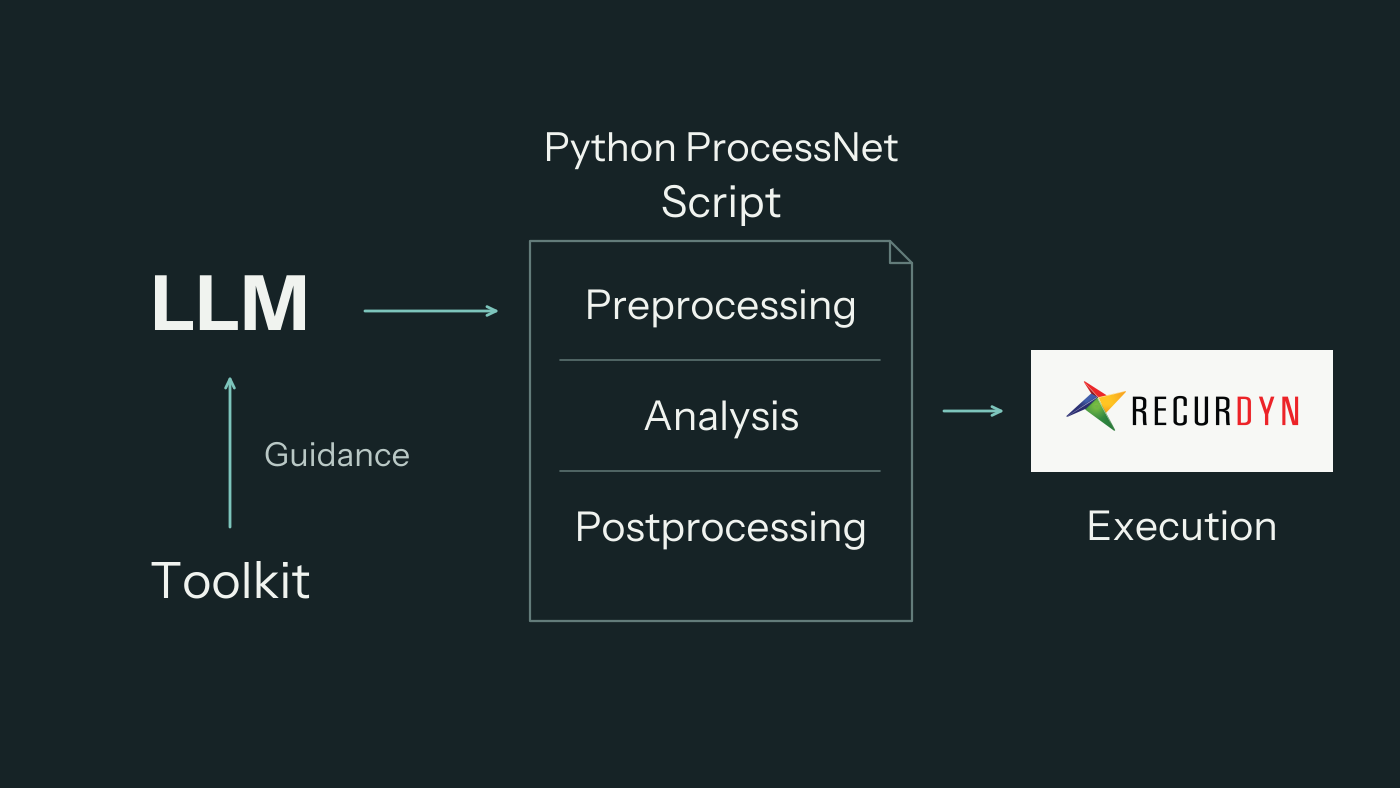
A multibody dynamics problem has to become a model before it can become a simulation. I developed RecurDyn ProcessNet Toolkit to help a large language model (LLM) make that translation: identify suitable RecurDyn capabilities and write Python ProcessNet scripts for preprocessing, analysis and postprocessing.
The Toolkit provides documentation and API evidence for that work. The LLM uses them to prepare the script; a surrounding workflow handles execution and review.
Why a Simulation Workflow Needs More Than a Prompt
A dynamics problem describes a system and asks for an answer—perhaps a joint force, a displacement history or the effect of a parameter change. Building a simulation requires additional decisions: which bodies to represent, how to constrain their motion, where to apply loads, and which quantities to extract.
Those decisions also have to be expressed through the software. An assistant needs to know which RecurDyn operations support the intended model, how their inputs are defined and what must exist before they can be used. A familiar mechanics concept is not enough to identify the correct software operation.
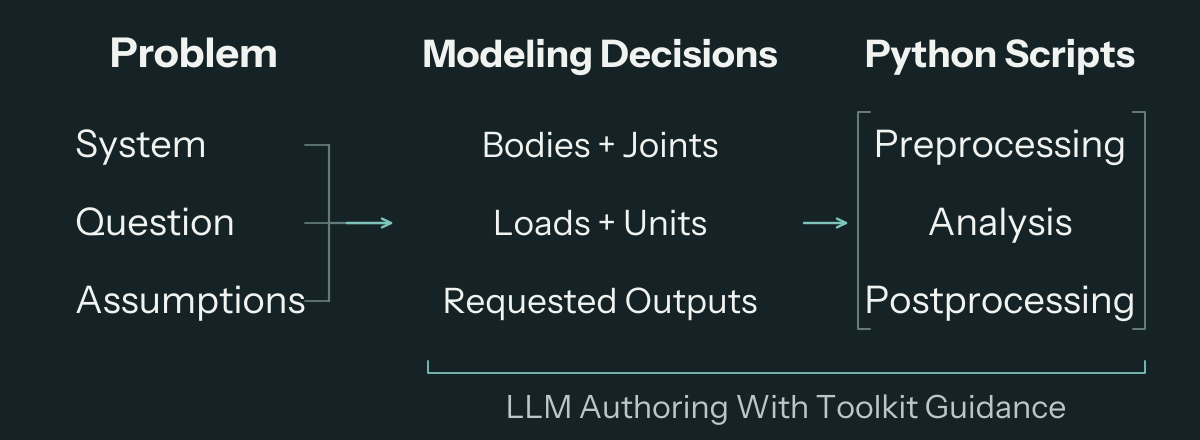
The Toolkit helps the LLM connect these two levels. It supplies documented capabilities and API information that the assistant can consult while deciding how to construct the model and write its automation script. The engineer supplies the physical problem and confirms consequential assumptions, such as the unit system, constraints and idealizations.
Giving the LLM a Documented Basis for Modeling
MCP, the Model Context Protocol, is a standard way for an AI assistant to access tools. Here, it makes the Toolkit’s documentation-grounded support available within the assistant’s working environment. Python ProcessNet is the interface through which the resulting scripts operate RecurDyn.
The useful connection is between a modeling question and a supported operation. Creating a body, assigning its properties, establishing a joint or requesting a result each requires the assistant to identify the relevant capability and understand how to use it. Looking up that information while preparing the work gives the generated script a basis that can be inspected.
With that information, the LLM can organize a problem into modeling steps and carry those choices into a coherent sequence of operations. Missing or unresolved information remains a reason to investigate or clarify the task before execution.
Scripts Across the Simulation Workflow
The central output is a Python ProcessNet script that expresses the intended work in RecurDyn. Its scope can span all three stages of a simulation study.
Preprocessing turns the problem definition into a model. The assistant prepares the operations for creating or importing geometry, defining bodies and their properties, connecting them with joints or contacts, and specifying loads and initial conditions. The modeling choices determine what the simulation represents.
Analysis carries the prepared model through the requested computation. The script configures and runs the analysis in RecurDyn. When a study compares parameter settings, the assistant can prepare the corresponding changes and analysis steps so that each result remains associated with its condition.
Postprocessing extracts the quantities needed to answer the original question. The script can retrieve result data, prepare plots and organize comparisons. Selecting the right output is part of the task: a model animation and a joint-force history answer different questions.
Keeping these stages in a retained script makes the work available for inspection, revision and another run in the prepared environment. A later change can be made in the relevant modeling or analysis step while preserving the connection to the requested output.
An Agentic Workflow With Supervised Execution
An agentic workflow lets the assistant choose tools, inspect their responses and use that information to decide its next step. Around the Toolkit-assisted authoring process, that means looking up capabilities, preparing a script, checking it and revising the work when a finding calls for a change.
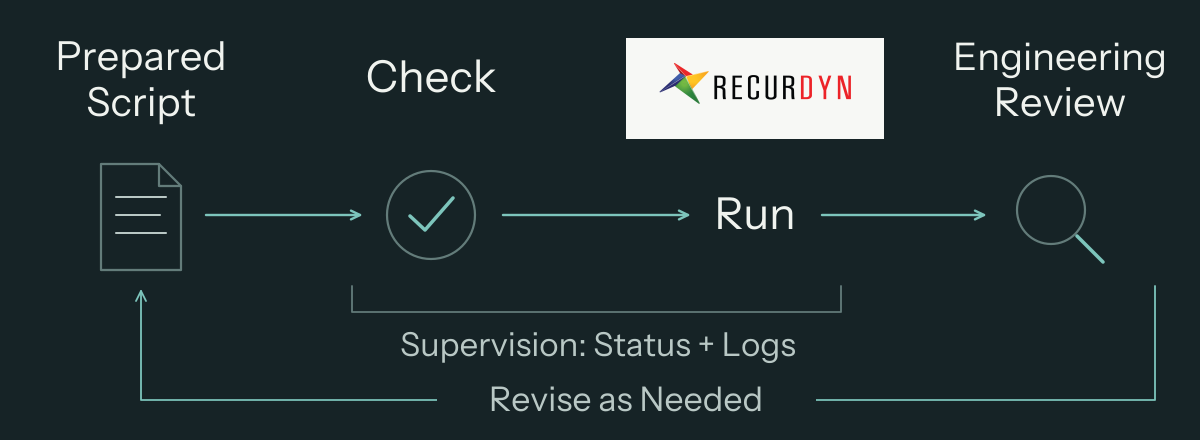
A harness is the supporting software that supervises execution. It provides checks before launch and tracks the run through status information and logs. The assistant can use those observations and the resulting model or outputs to continue the task.
These checks address different questions. Script checks can flag issues before launch; run information shows what happened during execution. Engineering review determines whether the model and outputs answer the intended problem. RecurDyn performs the numerical analysis, and the engineer judges the assumptions and interpretation.
Development Outcome and Potential Uses
I built the Toolkit to make RecurDyn’s documented capabilities usable while an LLM is preparing a simulation. The resulting scripts offer a basis for repeatable studies, parameter comparisons and model revisions, with the engineer retaining control over assumptions and interpretation.
Video Summary
The video below summarizes the Toolkit and the workflow described here.